Self-Service Ordering

Restaurant Ordering Kiosk
Let Customers Order Themselves

Billa Podu Restaurant Ordering Kiosk simplifies the complete self-ordering journey — from browsing menus and customising items to order confirmation and payment — helping restaurants deliver faster service without staff assistance.
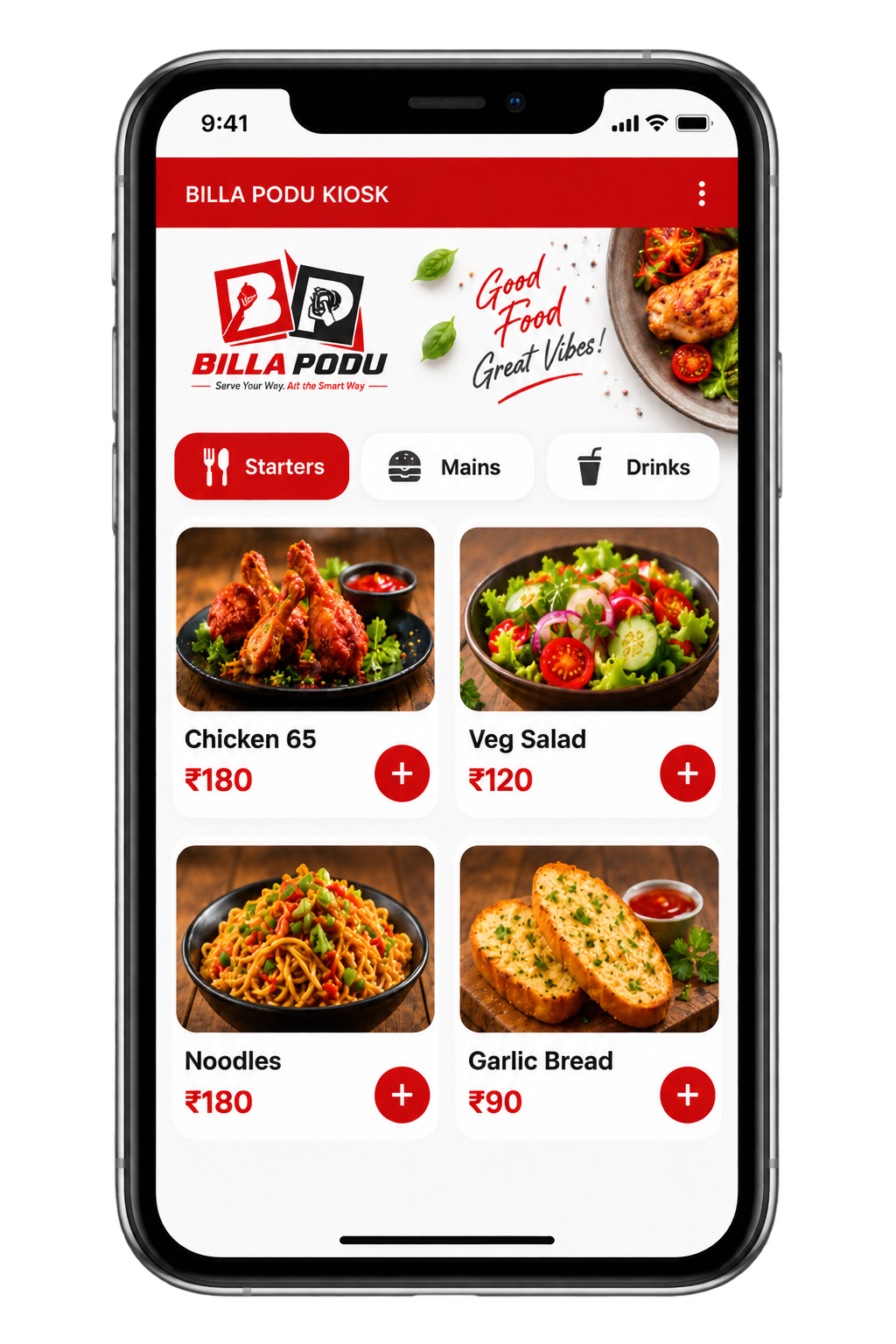
Billa Podu Kiosk Ordering Interface
How It Works

Order to Done in 5 Steps

Our Self Ordering Kiosk Software simplifies the entire ordering journey—from browsing menus and customising items to confirming orders and making payments—helping customers order independently and restaurants deliver faster service.

Step 01

Customer Arrives

Customer walks up to the kiosk and taps the screen to start browsing the live menu.

Step 02

Browses Menu

Browses categories, views item photos and descriptions, selects modifiers and adds items to cart.

Step 03

Confirms Order

Reviews the order summary and confirms. A unique token number is generated instantly.

Step 04

KOT Fires to Kitchen

The Kitchen Order Ticket is sent to the kitchen printer in under 3 seconds — no manual relay.

Step 05

Pay & Collect

Customer pays at the counter or kiosk, collects their token and waits for the order display to call their number.

Core Features

Full Kiosk Feature Set

Every feature in our Food Ordering Kiosk Software is designed to reduce queue times, minimise ordering errors and give customers a smooth self-service experience.

Full Menu Display

Your complete menu shown on the kiosk — categories, photos, descriptions and prices, always in sync with your dashboard.

Categorised menu with tab navigation
High-resolution item photos
Prices shown clearly per item
Unavailable items hidden automatically
Live sync — changes reflect instantly
Search bar for quick item lookup
Live sync
HD photos
Auto-hide unavailable

Modifiers & Add-ons

Customers personalise every order — spice level, portion size, add-ons — all configured by you in the dashboard.

Custom modifier groups per item
Optional or mandatory selections
Add-on pricing displayed clearly
Multi-level customisation supported
Notes printed on KOT automatically
Unlimited modifier groups configurable
Unlimited groups
Custom notes
Modifier pricing

Instant KOT to Kitchen

Every confirmed order fires as a KOT to the kitchen printer in under 3 seconds. No staff needed to relay anything.

Order fires to kitchen automatically
Kitchen printer assigns token number
Multiple station routing supported
KOT includes all modifiers and notes
Order queue visible in kitchen display
Zero manual relay — zero errors
Under 3 seconds
Multi-station
Zero errors

Multiple Payment Modes

Customers pay at the kiosk or counter using cash, UPI or card — whichever your setup supports.

Cash, UPI and card accepted
QR code payment option available
Digital receipt via WhatsApp
Thermal bill print on payment
All transactions logged automatically
GST breakdown on every bill
UPI / QR
WhatsApp bill
GST invoice

Token & Order Display

A live token display shows customers their order status — from preparation to ready for collection.

Unique token number per order
Live status: Preparing → Ready → Collected
Customer-facing display board
Audio alert on order ready (optional)
Multiple orders tracked simultaneously
Token printed on KOT slip automatically
Unique tokens
Audio alert
Display board

Reports & Analytics

Every kiosk order is captured in your owner dashboard — full visibility into sales, peak hours and top items.

Daily kiosk sales summary
Item-wise order breakdown
Peak hour traffic analysis
Payment mode report
GST report export for accounting
Export to Excel / PDF in one click
Live dashboard
Export reports
Peak hour data

Idle Screen & Promotions

When the kiosk is not in use, it displays your promotional banners and brand imagery to attract customers.

Custom promotional banner upload
Brand logo and colour theme
Auto-reset to idle after order
Attract screen with menu highlights
Configurable from dashboard
Multiple banner slides supported
Branded theme
Multi-slide banners
Auto idle reset

Secure & Reliable

Billa Podu kiosk runs on secure cloud infrastructure with automatic updates and encrypted transaction handling.

Cloud-hosted — no local server needed
Automatic software updates
Encrypted transaction processing
Offline order queueing if network drops
99.9% uptime guarantee
Role-based access control
Cloud-hosted
Encrypted
99.9% uptime
Detailed Workflow

Kiosk Workflow

From the moment a customer walks in to when the order reaches your kitchen — here is how every step works in detail.

Customer Walks In

The kiosk is placed at the entrance or counter. When a customer approaches, the idle screen activates and displays your promotional banner or menu highlights. Tapping the screen starts the ordering session immediately.

No queue for a cashier Instant session start Branded welcome screen

Menu Browsing & Item Selection

The full menu is displayed with category tabs at the top. Customers swipe through categories, tap items to see full descriptions and photos, select add-ons or modifiers and add items to their cart.

Live menu sync Photos & descriptions Modifier selection Cart management

Order Review & Confirmation

Before confirming, the customer sees a full order summary with item names, quantities, modifiers and the total amount. They can remove items or update quantities before tapping Confirm Order.

Clear order summary Edit before confirm GST shown on total

KOT Fires to Kitchen Instantly

On confirmation, the order is sent as a Kitchen Order Ticket to the designated kitchen printer in under 3 seconds. The kitchen team sees the order immediately with all items, quantities and special notes.

Under 3 second delivery Multi-station routing Zero errors

Payment & Bill

The customer pays at the kiosk or counter. Cash, UPI and card are all supported. A bill with GST breakdown is printed or sent via WhatsApp. The transaction is instantly recorded in your dashboard reports.

Cash, UPI, Card GST invoice WhatsApp bill sharing Auto-logged to reports
Best Suited For

Best-Fit Restaurants

Billa Podu's Kiosk Model works exceptionally well for restaurants with high customer volume, limited staff, and quick-service formats, helping businesses manage orders faster with a seamless self-ordering experience.

Quick Service Restaurants

Fast-food and QSR formats where speed and queue reduction are the top priority — kiosk eliminates the bottleneck at the counter.

Fit Score
98%
No cashier queue — instant self-order
Handles 3— more orders per hour
Reduce front-of-house staff costs
Upsell add-ons automatically on screen
Token system keeps order flow smooth
Zero order miscommunication errors
0
% Faster Service
0
% More Orders/Hr
0
Order Errors
0
Day to Go Live

Food Courts & Malls

High-traffic food court stalls serving hundreds in peak hours — the kiosk handles volume without adding headcount.

Fit Score
95%
Multiple kiosks run simultaneously
Token display manages crowd expectations
No language barrier — visual menu
Peak hour reports for staffing decisions
Handles lunch rush without extra staff
Branded idle screen attracts walk-bys
0
Orders/Day Capacity
0
% Shorter Queues
0
Sec to KOT
0
Hr Uptime

Canteens & Cafeterias

Office canteens, college cafeterias and institutional food services with predictable peak hours and repeat customers.

Fit Score
92%
Handles entire lunch rush autonomously
Daily menu change syncs in seconds
Students / staff order in under 60 sec
Token display keeps queues organised
Reduced cashier error on busy days
GST invoicing for institutional billing
0
Sec Avg Order Time
0
% Less Staff Needed
0
% Accurate Orders
0
Day Setup

Cloud Kitchens

Delivery-first kitchens with a walk-in pickup counter — kiosk lets customers self-order without any front-end staff required.

Fit Score
88%
Zero front-desk staff required
Walk-in + delivery orders on one system
Token display for pickup notification
UPI/QR payment — no cash handling
Full dashboard reports for both channels
Runs 24/7 with cloud-hosted uptime
0
Front Desk Staff
0
Hr Automated Ops
0
Sec KOT Fire
0
% Uptime

Bakeries & Cafes

Counter-service bakeries and cafes where customers browse at their own pace — the kiosk removes pressure from the counter.

Fit Score
85%
Customers browse at leisure — no rush
High-res photos drive impulse orders
Add-ons increase average order value
Idle screen shows daily specials
WhatsApp bill — no paper receipt needed
Single device handles orders + payments
0
% Higher Order Value
0
Device Does It All
0
Paper Bills Needed
0
% Brand Customised

Event & Stadium Counters

High-volume event venues where burst-hour speed matters most — multiple kiosks serve large crowds simultaneously.

Fit Score
90%
Handles burst-hour volume easily
Multiple kiosks on same dashboard
Token display manages crowd flow
UPI payment — no cash queue
Event menu setup in minutes
Post-event sales report for organisers
0
Orders/Hr Possible
0
% Less Queue Time
0
Min Menu Setup
0
Sec to KOT
Model Comparison

Kiosk vs Waiter
Choose Your Service Style

Both run on the Billa Podu platform. Compare the two workflows and choose the setup that best fits your restaurant — or combine them for flexible service.

Kiosk Model

Self-service counter ordering — customer does it all

Zero Staff Required
VS

Waiter App

Staff-led table service from mobile device

Full Table Service
Feature
Kiosk
Waiter App
Customer self-orders
Yes
No
Waiter takes table order
No
Yes
KOT sent to kitchen
Yes
Yes
Token display for pickup
Yes
No
Table-side billing
No
Yes
Staff required for orders
None
Waiter needed
Idle screen & promotions
Yes
No
Multiple payment modes
Yes
Yes
GST billing & reports
Yes
Yes
Best for
QSR, food courts, canteens
Dine-in, fine dining, table service

Use Both Together — Maximum Coverage

Many restaurants run both models on the same Billa Podu dashboard — kiosk for walk-in counter orders and waiter app for table service.

Shared menu & dashboard Unified reports Single subscription No extra setup
Book a Demo
FAQ

Frequently Asked Questions

Everything you need to know about the Billa Podu Kiosk Model — answered simply.

The Billa Podu kiosk runs on an Android tablet or dedicated kiosk hardware with a touchscreen display. Our team assists with hardware procurement and setup during onboarding — you don't need to source anything separately.
Yes. Many restaurants use both models simultaneously — the kiosk for walk-in counter orders and the waiter app for table service. Both share the same live menu, dashboard and reports with no extra configuration.
The kiosk requires an active internet connection to sync menu data and send KOTs. If the connection drops temporarily, orders are queued locally and sent automatically once connectivity is restored.
Any menu change made in the Admin Dashboard — price update, new item, availability toggle — reflects on the kiosk in real time without requiring a manual refresh or restart on the device.
Yes. A thermal printer connected to the kiosk can print receipts on order confirmation. Alternatively, a digital receipt with full GST breakdown can be sent to the customer via WhatsApp — no paper needed.
Most kiosk setups are completed within 1 day. This includes hardware installation, menu upload, printer configuration and a full test run with your team before going live — zero coding required.

Still have questions?

Our team is happy to walk you through the kiosk setup live — no commitment needed.

FAQ

Frequently Asked Questions

Common questions about the Billa Podu Kiosk model.

Loading FAQs...

Ready to Add a Kiosk to Your Restaurant?

Book a free demo and our team will show you exactly how the Billa Podu kiosk works — live, with your restaurant's menu.
Facebook Instagram WhatsApp YouTube