Billa Podu's Restaurant Order Taking App empowers waiters to take orders, send KOTs instantly, manage tables, and process payments directly from their mobile device for faster and smoother restaurant operations.
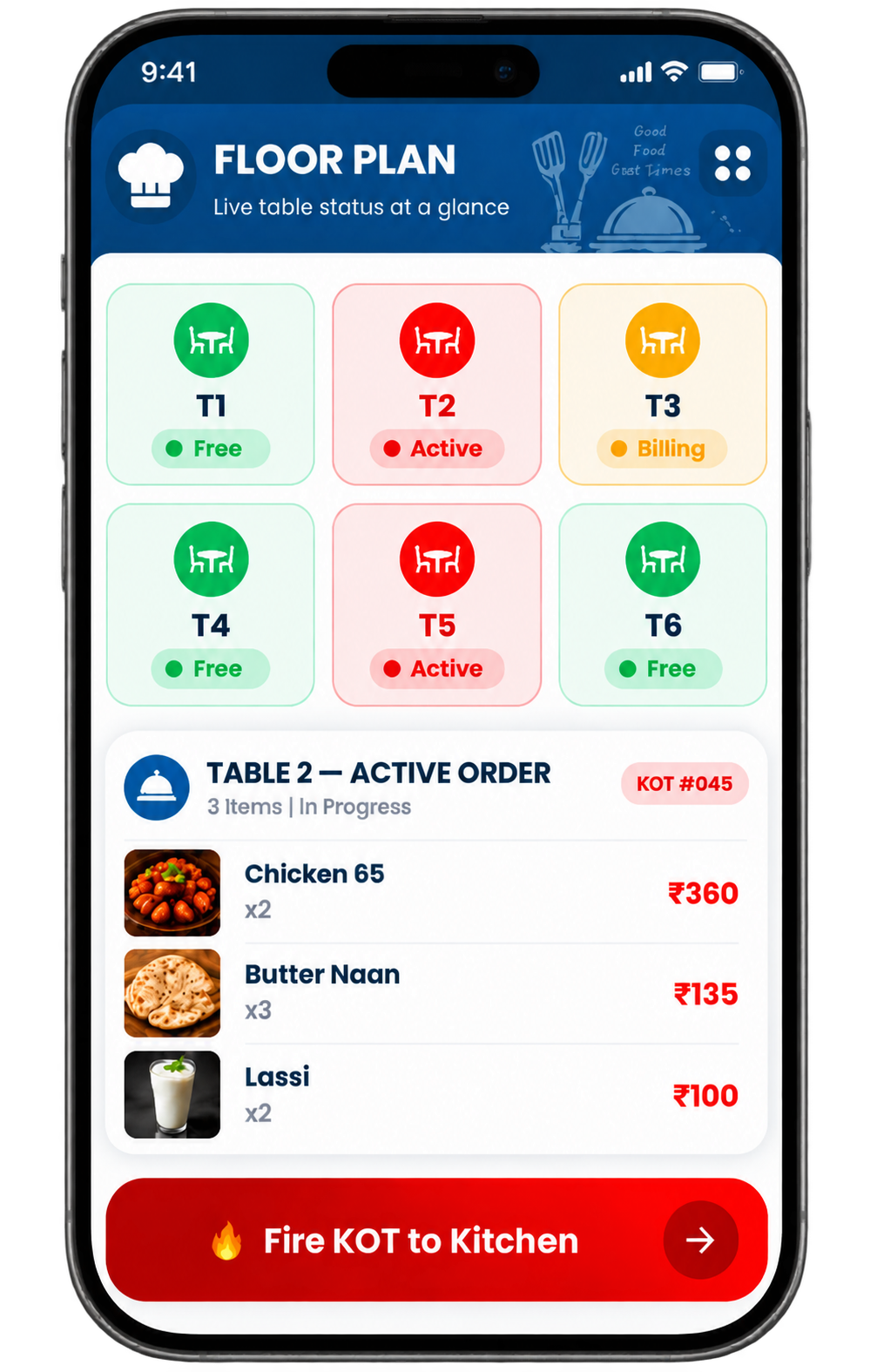
Our Waiter Ordering App handles the complete table service journey—from login to table closure—on a single Android device.
Waiter taps their name and enters their PIN to log in instantly — no username or password.
The live floor plan shows all tables with colour-coded status. Waiter taps a free table to start.
Browse menu by category, tap items to add, set quantities and add special instructions per item.
Tap Fire KOT — the order reaches the kitchen printer in under 3 seconds with full item details.
When the customer is ready, generate the bill with GST, apply discounts and print or share via WhatsApp.
Accept payment, close the table — it resets to Free on the floor plan immediately for the next guest.
Every feature in the waiter app is built around one goal — faster, more accurate table service with less effort for your staff.
Real-time table map showing every table's status — Free, Active or Billing — visible to all staff simultaneously.
Browse live menu by category, add items with a tap, set quantities and include special instructions per item.
One tap sends the Kitchen Order Ticket directly to the kitchen printer — under 3 seconds, zero miscommunication.
Move active orders between tables without losing any items, or merge two tables into one seamless order.
Generate bills, apply discounts and accept multiple payment modes directly from the waiter app — no cashier counter needed.
Any menu change by the manager — price update, new item, availability — reflects instantly on every waiter device.
Print on thermal printer or send digitally to the customer's WhatsApp — both with a single tap from the waiter app.
Each staff member gets the right level of access for their role — waiters cannot void bills or view reports, only managers can.
From the moment a guest is seated to when the table is cleared — here is how the Billa Podu waiter app handles every step.
Each waiter opens the Billa Podu app on their Android device. They tap their name from the staff list and enter their unique PIN. Login is instant — no email, no password, no delay. Their assigned tables appear on the floor plan immediately.
The floor plan shows all tables with live colour-coded status. The waiter taps a green (free) table to start a new order. If the table is already active, they can view and update the existing order. Multiple floors and sections are supported and the waiter only sees tables assigned to their section.
The waiter browses the menu by category — Starters, Mains, Beverages and so on. They tap items to add them, adjust quantities and for items with modifiers (spice level, portion size, add-ons) the selection screen appears automatically. They can also type a special instruction per item — for example "no onion" or "extra spicy" — which will appear on the KOT.
After reviewing the order summary, the waiter taps Fire KOT. The Kitchen Order Ticket is sent to the designated kitchen printer in under 3 seconds — routed automatically to the correct station. Food items go to the kitchen, beverages to the bar. The kitchen team sees the full order with all modifiers and notes, with no manual relay or phone calls needed.
When the guest is ready to pay, the waiter taps Generate Bill from the table screen. The bill shows all ordered items, quantities, applicable GST and the total. Discounts can be applied with manager authorisation. If the guests want to pay separately, the split bill feature divides the total by number of guests or by specific items.
The waiter selects the payment mode — cash, UPI or card — and records the amount received. A bill is printed on the thermal printer or sent via WhatsApp. After payment is confirmed, the waiter closes the table. The table status resets to Free on the floor plan instantly, ready for the next guest. The transaction is saved to the dashboard reports automatically.
The floor plan gives your entire team a real-time picture of every table — who is seated, what is ordered and what is being billed — all at a glance.
Table is empty and available. Waiter can tap to start a new order immediately. Displayed in green on the floor plan.
Table has an open order. KOT has been fired to the kitchen. Waiter can add more items or check order status. Displayed in red.
Bill has been generated and the table is awaiting payment. Cashier or waiter is processing the transaction. Displayed in amber.
Every staff member gets a role with the exact permissions they need — no more, no less.
Takes orders, fires KOTs and manages assigned tables. Cannot void items, apply discounts or view reports.
Generates bills, applies discounts and accepts payments. Can view today's transaction summary but not full reports.
Full access — void orders, manage staff, edit menu and view all reports from any device at any time.
Our Waiter App for Table Orders is ideal for restaurants where table service is at the heart of the dining experience.
High-end restaurants where attentive table service and accurate order management are essential.
Mid-range restaurants with seated table service where speed and accuracy matter equally.
Multi-outlet hotel restaurants and in-room dining operations that need centralised order management.
Traditional Indian restaurants with high volume, multi-table operations and complex orders.
Table-service bars where orders need to be routed to both kitchen and bar station simultaneously.
Large-venue operations with many tables that need a coordinated team of waiters working simultaneously.
Everything you need to know about the Billa Podu Waiter Mobile App — answered simply.
Our team will walk you through the waiter app live — no commitment needed.
Book a free demo and see how the Billa Podu waiter app transforms your floor operations — live, with a real restaurant setup.